09 October 2025

💡 How to Import a Bacpac File into a Cloud-Hosted D365 F&O Environment

When working with a newly deployed cloud-hosted Dynamics 365 Finance & Operations (D365 F&O) environment, you might want to populate it with data from a .bacpac file—typically exported from a sandbox or UAT environment.

There are several ways to do this, and unfortunately, quite a few things can go wrong along the way. My preferred method is using the d365fo.tools PowerShell module, which simplifies the process of repairing and importing .bacpac files.

🛠 Step 1: Install d365fo.tools

Start by installing the required PowerShell modules:

Install-PackageProvider nuget -Scope AllUsers -Force -Confirm:$false

Install-Module -Name d365fo.tools -AllowClobber -Scope AllUsers -Force -Confirm:$false

Invoke-D365InstallSqlPackage

⚠️ Troubleshooting Installation Issues

If you encounter the following error:

PackageManagement\Install-Package : No match was found for the specified search criteria and module name 'd365fo.tools'. Try Get-PSRepository to see all available registered module repositories.

You’ll need to register the default repository manually:

[Net.ServicePointManager]::SecurityProtocol = [Net.SecurityProtocolType]::Tls12

Register-PSRepository -Default -Verbose

Verify the repository registration:

Get-PSRepository

🔧 Step 2: Repair the Bacpac File (if needed)

Sometimes the .bacpac file needs to be repaired before it can be imported:

Repair-D365BacpacModelFile -Path "D:\UAT.bacpac" -Verbose

📥 Step 3: Import the Bacpac File

Once repaired (or if the original file is fine), import it into your environment:

Import-D365Bacpac -ImportModeTier1 -BacpacFile "D:\UAT.bacpac" -NewDatabaseName "AXDB_import" -Verbose

🔄 Step 4: Switch Databases and Sync

After importing, you’ll need to stop the environment, switch the active database, perform a DB sync, and restart everything:

Stop-D365Environment -All

Switch-D365ActiveDatabase -SourceDatabaseName AXDB_import

Invoke-D365DBSync -ShowOriginalProgress

Start-D365Environment -All

07 October 2024

truncate tables with a suffix

While working with D365 F&O I often have to delete test data from several tables with a prefix or suffix. The following SQL script helps a lot to generate the truncate commands for these tables. For example to empty all staging tables from a BYOD.


DECLARE @suffix NVARCHAR(50) = 'staging'; 


SELECT TABLE_SCHEMA, TABLE_NAME, 'truncate table ' + TABLE_NAME as SQLCommand

FROM INFORMATION_SCHEMA.TABLES

WHERE TABLE_NAME LIKE '%' + @suffix;

03 April 2023

LCS Shared asset library - different content per geo location

 I just tried to download a software deployablte package from the shared asset library. 

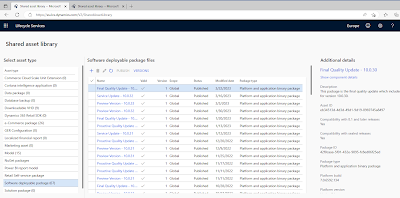
Unfortunately it was not available. That was quite confusing at first. But than I realized that I'm using lcs in geo location Europe lately: https://eu.lcs.dynamics.com/V2/SharedAssetLibrary

The asset library for Europe contains just (67) software deployable packages:


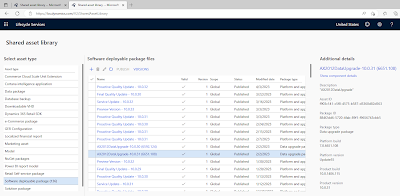
Switching geo location to US solved the problem. There I do see more assets (136). 


Has anyone ever noticed this. I'm using the same tenant.

I tried other geo locations and all do have different amount of software deployable packages.

@Microsoft: Please keep them in sync 

28 March 2023

Microsoft Teams 2.0 ;)

Finally Microsoft Teams is supporting multi tenant activity in the windows app. 

What’s New in Microsoft Teams at Enterprise Connect 2023 - Microsoft Community Hub


15 December 2022

Download large db backups from LCS asset library

If you have to download a large database backup from LCS asset library this might be a real pain. It is slow and unstable if you just download it with your browser.

 You should always use azcopy: Copy or move data to Azure Storage by using AzCopy v10 | Microsoft Learn

In LCS just click on the "Generate SAS link" this will copy the download link into the clipboard. Open a command prompt and run

azcopy "SASlink" t:\yourLocalFolder


05 April 2022

D365 VHD for 10.0.24 is finally available

 For all of you looking for a new D365 VHD Microsoft has just released the VHD with version 10.0.24


19 October 2021

Call Dynamics AX2012 AIF Webservice from Postman

Lately I was forced to call a Dynamics AX2012 webservice from Postman. The service is deployed as an HTTP service inbound port in AX on the IIS instance.

First of all I had to authenticate against AX to get around "IIS 8.5 Detailed Error - 401.1 - Unauthorized" - there are some posts in the WWW suggesting to use Fiddler as a supporting tool for the authentication. In my case I was able to use NTLM authentication from postman:


Even though this is still beta it is working quite well for me. 

After that I did some tests with GET and POST. In the header it is important to set

Content-Type = text/xml; charset=UTF-8
SOAPAction = http://tempuri.org/AXService/ProcessWhatever

In the POST scenario I was facing "400 Bad request". This is quite chalanging cause it just means that there is something wrong within the Body. In my case I finally wrote a working XMLwhich looks something like this:

<s:Envelope xmlns:s="http://schemas.xmlsoap.org/soap/envelope/">
<s:Header>
<h:CallContext xmlns:h="http://schemas.microsoft.com/dynamics/2010/01/datacontracts"
               xmlns:i="http://www.w3.org/2001/XMLSchema-instance">
<h:Company>ABC</h:Company>
<h:Language i:nil="true"/>
<h:LogonAsUser i:nil="true"/>
<h:MessageId i:nil="true"/>
<h:PartitionKey i:nil="true"/>
<h:PropertyBag i:nil="true" 
                            xmlns:a="http://schemas.microsoft.com/2003/10/Serialization/Arrays"/>
</h:CallContext>
</s:Header>
<s:Body>
<ABCServiceRequest xmlns="http://tempuri.org">
<data>123</data>
</ABCServiceRequest >
</s:Body>
</s:Envelope>

The last error I saw was "500 internal server error" - Unexpected character encountered while parsing value. This was due to a wrong value within the body of the XML.

After all that was solved I now can try the AX interface through postman and I'm happy to see "200 Ok" and the response from the service

<s:Envelope xmlns:s="http://schemas.xmlsoap.org/soap/envelope/">
    <s:Body>
        <ABCServiceRequest xmlns="http://tempuri.org">
            <response>processed :) </response>
        </ABCServiceRequest >
    </s:Body>
</s:Envelope>


08 March 2021

AX2012 Aos start error: Server terminated unexpectedly with 110 exitcode.

Yes AX2012, back to the past :) 

I just tried to start an old AOS with a new empty database. 
First thing that popped up was the error code 110. So what to do? 
Checking the new database I noticed that the two stored procedures CREATESERVERSESSIONS and CREATUSERSESSIONS were missing. 

The solution for this error code was just to create them. 

USE [AX2012DB] 
GO 
 /****** Object: StoredProcedure [dbo].[CREATESERVERSESSIONS] Script Date: 12/24/2031 11:11:11 AM ******/ 

SET ANSI_NULLS ON 
GO 

SET QUOTED_IDENTIFIER ON 
GO 

CREATE procedure [dbo].[CREATESERVERSESSIONS] @aosId nvarchar(50), @version int, @instanceName nvarchar(50), @recid bigint, @maxservers int, @status int, @loadbalance int, @workload int, @serverid int OUTPUT as declare @first as nvarchar(50) declare @max_val as int begin select top 1 @first = SERVERID from SYSSERVERSESSIONS WITH (UPDLOCK, READPAST) where STATUS = 0 and AOSID = @aosId and INSTANCE_NAME = @instanceName if (select count(SERVERID) from SYSSERVERSESSIONS where SERVERID IN (@first)) > 0 begin update SYSSERVERSESSIONS set AOSID = @aosId, VERSION = @version, INSTANCE_NAME = @instanceName, LOGINDATETIME = dateadd(ms, -datepart(ms,getutcdate()), getutcdate()), LASTUPDATEDATETIME = dateadd(ms, -datepart(ms,getutcdate()), getutcdate()), STATUS = @status, WORKLOAD = @workload, AOSACCOUNT = SUSER_SNAME() where SERVERID IN (@first) and ( ((select count(SERVERID) from SYSSERVERSESSIONS where STATUS = 1 and LOADBALANCE = 0) < @maxservers) OR LOADBALANCE != 0 ) if @@ROWCOUNT = 0 select @serverid = 0 else select @serverid = @first end else begin if (select count(SERVERID) from SYSSERVERSESSIONS WITH (UPDLOCK) where STATUS = 1 and LOADBALANCE = 0) >= @maxservers select @serverid = 0 else begin if (select count(SERVERID) from SYSSERVERSESSIONS) = 0 select @max_val = 1 else select @max_val = max(SERVERID)+1 from SYSSERVERSESSIONS insert into SYSSERVERSESSIONS(SERVERID, AOSID, INSTANCE_NAME, VERSION, LOGINDATETIME, LASTUPDATEDATETIME, STATUS, RECID, LOADBALANCE, WORKLOAD, AOSACCOUNT) values(@max_val, @aosId, @instanceName, @version, dateadd(ms, -datepart(ms,getutcdate()), getutcdate()), dateadd(ms, -datepart(ms,getutcdate()), getutcdate()), @status, @recid, @loadbalance, @workload, SUSER_SNAME()) select @serverid = @max_val end end end 
GO 

CREATE procedure [dbo].[CREATEUSERSESSIONS] @clientType int, @sessionType int, @serverid int, @versionid int, @userid nvarchar(8), @lanExt nvarchar(10), @manExt nvarchar(10), @computerName nvarchar(80), @sid nvarchar(124), @recid bigint, @startId int, @maxusers int, @licenseType int, @masterId int, @maxClientId int, @dataPartition nvarchar(8), @sessionid int OUTPUT, @loginDateTime datetime OUTPUT as declare @return_val as int declare @first as int declare @max_val as int declare @counter as int begin select @sessionid = -1 select @max_val = -1 select @counter = 0 select @loginDateTime = dateadd(ms, -datepart(ms,getutcdate()), getutcdate()) if(not exists(select * from SYSSERVERSESSIONS WITH (NOLOCK) where SERVERID = @serverid AND Status = 1)) begin select @sessionid = -2 return end select @first = min(SESSIONID) from SYSCLIENTSESSIONS WITH (UPDLOCK,READPAST) where STATUS = 0 and SESSIONID > @maxClientId and SESSIONID <> @masterId if (select count(*) from SYSCLIENTSESSIONS where SESSIONID IN (@first)) > 0 begin if (@licenseType = 0) begin update SYSCLIENTSESSIONS set STATUS = 1, VERSION = @versionid, SERVERID = @serverid, USERID = @userid, LOGINDATETIME = @loginDateTime, SID = @sid, USERLANGUAGE = @lanExt, HELPLANGUAGE = @manExt, CLIENTTYPE = @clientType, SESSIONTYPE = @sessionType, CLIENTCOMPUTER = @computerName, DATAPARTITION = @dataPartition where SESSIONID IN (@first) end else if (@licenseType = 1) begin update SYSCLIENTSESSIONS set STATUS = 1, VERSION = @versionid, SERVERID = @serverid, USERID = @userid, LOGINDATETIME = @loginDateTime, SID = @sid, USERLANGUAGE = @lanExt, HELPLANGUAGE = @manExt, CLIENTTYPE = @clientType, SESSIONTYPE = @sessionType, CLIENTCOMPUTER = @computerName, DATAPARTITION = @dataPartition where SESSIONID IN (@first) and ((select count(SESSIONID) from SYSCLIENTSESSIONS where CLIENTTYPE = @clientType and ((STATUS = 1) or (STATUS = 2))) < @maxusers) end else if (@licenseType = 2) begin update SYSCLIENTSESSIONS set STATUS = 1, VERSION = @versionid, SERVERID = @serverid, USERID = @userid, LOGINDATETIME = @loginDateTime, SID = @sid, USERLANGUAGE = @lanExt, HELPLANGUAGE = @manExt, CLIENTTYPE = @clientType, SESSIONTYPE = @sessionType, CLIENTCOMPUTER = @computerName, DATAPARTITION = @dataPartition where SESSIONID IN (@first) and ( (select count(SESSIONID) from SYSCLIENTSESSIONS where CLIENTTYPE = @clientType and (USERID = @userid) and ((STATUS = 1) or (STATUS = 2))) > 0 or (select count(distinct USERID) from SYSCLIENTSESSIONS where CLIENTTYPE = @clientType and ((STATUS = 1) or (STATUS = 2))) < @maxusers ) end if @@ROWCOUNT = 0 select @sessionid = 0 else select @sessionid = @first end else begin if (@licenseType = 1) begin if (select count(SESSIONID) from SYSCLIENTSESSIONS where CLIENTTYPE = @clientType and ((STATUS = 1) or (STATUS = 2))) >= @maxusers select @sessionid = 0 end else if (@licenseType = 2) begin if ( ((select count(distinct USERID) from SYSCLIENTSESSIONS where CLIENTTYPE = @clientType and ((STATUS = 1) or (STATUS = 2))) >= @maxusers) and ((select count(SESSIONID) from SYSCLIENTSESSIONS where CLIENTTYPE = @clientType and (USERID = @userid) and ((STATUS = 1) or (STATUS = 2))) = 0) ) select @sessionid = 0 end if (@sessionid = -1) or (@licenseType = 0) begin while (@sessionid = -1 and @counter < 5) begin set @counter = @counter + 1 if (select count(SESSIONID) from SYSCLIENTSESSIONS WITH (UPDLOCK) where STATUS = 0 or STATUS = 1 or STATUS = 2 or STATUS = 3) = 0 select @max_val = @startId else select @max_val = max(SESSIONID)+1 from SYSCLIENTSESSIONS WITH (UPDLOCK) if (@max_val > 65535) select @sessionid = -3 else begin insert into SYSCLIENTSESSIONS(SESSIONID, SERVERID, VERSION, LOGINDATETIME, USERID, SID, USERLANGUAGE, HELPLANGUAGE, CLIENTTYPE, SESSIONTYPE, RECID, CLIENTCOMPUTER, STATUS, DATAPARTITION) values(@max_val, @serverid, @versionid, @loginDateTime, @userid, @sid, @lanExt, @manExt, @clientType, @sessionType, @recid, @computerName, 1, @dataPartition) if @@ROWCOUNT = 0 begin select @sessionid = -1 end else select @sessionid = @max_val end end end end end 
GO

22 July 2020

D365 F&O SSRS Report drillthrough links

Because I always forget the syntax, here is a sample of a drill through link in an SSRS report 

=Microsoft.Dynamics.Framework.Reports.BuiltInMethods.GenerateDrillThroughLink(Parameters!AX_ReportContext.Value, Parameters!AX_UserContext.Value, "TWESalesTableMenuItem", "Display", "TWESalesTable", "SalesId", Fields!SalesId.Value)

If it requires more than one parameter:

=Microsoft.Dynamics.Framework.Reports.BuiltInMethods.GenerateDrillThroughLink(Parameters!AX_ReportContext.Value, Parameters!AX_UserContext.Value, "TWESalesTableMenuItem", "Display", "TWESalesTable", "TWECustGroup", Fields!CustGroup.Value, "TWEOrderStatus", "Open order")


25 June 2020

D365 EventLog error ID1014: The signature is not valid. The data may have been tampered with.


I just found an error message in the event log of an D365 F&O cloud environment that was confusing me. For me the environment was running but I found out that a colleague got the error message: 

Error 500: There is a problem with the server
Sorry, the server has encountered an error. It is either not available or it can't respond at this time. Please contact your system administrator.

This resulted in the error message in the event log. after he switched to another browser it did no longer appear. Clearing the browser cache should also solve this problem.

Microsoft-Dynamics-AX-SystemRuntime
exceptionMessage ID1014: The signature is not valid. The data may have been tampered with.
exceptionSource System.IdentityModel
exceptionStackTrace at System.IdentityModel.RsaSignatureCookieTransform.Decode(Byte[] encoded) at System.IdentityModel.Tokens.SessionSecurityTokenHandler.ApplyTransforms(Byte[] cookie, Boolean outbound) at System.IdentityModel.Tokens.SessionSecurityTokenHandler.ReadToken(XmlReader reader, SecurityTokenResolver tokenResolver) at System.IdentityModel.Tokens.SessionSecurityTokenHandler.ReadToken(Byte[] token, SecurityTokenResolver tokenResolver) at System.IdentityModel.Services.SessionAuthenticationModule.ReadSessionTokenFromCookie(Byte[] sessionCookie) at System.IdentityModel.Services.SessionAuthenticationModule.TryReadSessionTokenFromCookie(SessionSecurityToken& sessionToken) at System.IdentityModel.Services.SessionAuthenticationModule.OnAuthenticateRequest(Object sender, EventArgs eventArgs) at System.Web.HttpApplication.SyncEventExecutionStep.System.Web.HttpApplication.IExecutionStep.Execute() at System.Web.HttpApplication.ExecuteStepImpl(IExecutionStep step) at System.Web.HttpApplication.ExecuteStep(IExecutionStep step, Boolean& completedSynchronously)
url /
Method GET
httpStatusCode 500
userGuid {00000000-0000-0000-0000-000000000000}

31 March 2020

Parameter _reportName cannot be null or empty - in D365 F&O

lately we receive the error message "Parameter _reportName cannot be null or empty" when trying to print a report from a journal with view copy or view original. Reprinting using print management is working fine. 
This issue only occurred in our SAT environment in all other environments, Dev, Test and Build it was working as expected.
In older days (AX 2012) I just did a full compile when I got this error. But what to do now? 
After a bit of debugging the result was quite interesting: The print management framework is looking for a report format in the table PrintMgmtReportFormat. The select statement has a where clause which looks for the report and requires the field system to be true. In our DB somehow the reports we were looking for had system flag = no so the _reportName was really empty.
So for everyone who is getting this error message in D365 F&O check the PrintMgmtReportFormat table.


06 February 2020

Get security protocal in D365 x++ code

Sometimes it is interesting to know what security protocol, or which TLS verion is used when it comes to debugging connectivity issues.

This line is used to set the level:

System.Net.ServicePointManager::set_SecurityProtocol(System.Net.SecurityProtocolType::Tls12);

and this piece of code will show you what protocol is enabled

  int secProtocol = System.Net.ServicePointManager::get_SecurityProtocol();
    
  boolean ssl3 = secProtocol == enum2int(System.Net.SecurityProtocolType::Ssl3);
  boolean tls = secProtocol == enum2int(System.Net.SecurityProtocolType::Tls); 
  boolean tls11 = secProtocol == enum2int(System.Net.SecurityProtocolType::Tls11);
  boolean tls12 = secProtocol == enum2int(System.Net.SecurityProtocolType::Tls12);
  boolean tls13 = secProtocol == 12288;
        
  info(strFmt("SSL3 enabled: '%1' | TLS enabled: '%2' | TLS1.1 enabled: '%3' | TLS1.2 enabled: '%4' | TLS1.3 enabled: '%5'", ssl3, tls, tls11, tls12, tls13));


Values:

  • Ssl3 48
    Specifies the Secure Socket Layer (SSL) 3.0 security protocol. SSL 3.0 has been superseded by the Transport Layer Security (TLS) protocol and is provided for backward compatibility only.
  • SystemDefault 0
    Allows the operating system to choose the best protocol to use, and to block protocols that are not secure. Unless your app has a specific reason not to, you should use this value.
  • Tls 192
    Specifies the Transport Layer Security (TLS) 1.0 security protocol. The TLS 1.0 protocol is defined in IETF RFC 2246.
  • Tls11 768
    Specifies the Transport Layer Security (TLS) 1.1 security protocol. The TLS 1.1 protocol is defined in IETF RFC 4346. On Windows systems, this value is supported starting with Windows 7.
  • Tls12 3072
    Specifies the Transport Layer Security (TLS) 1.2 security protocol. The TLS 1.2 protocol is defined in IETF RFC 5246. On Windows systems, this value is supported starting with Windows 7.
  • Tls13 12288
    Specifies the TLS 1.3 security protocol. The TLS protocol is defined in IETF RFC 8446.

19 October 2019

DevOps Error: Process 'msbuild.exe' exited with code '1'.

If the build pipeline fails directly after it has startet with the build error: Process 'msbuild.exe' exited with code '1'. This can have multiple reasons. To do the build it requires the AXModulesBuild.proj
So first of all check the folder in the error message. If you are using another folder, different branch,... go to the build pipeline and check the projects path:


Error Message:

Starting: Build the solution
==============================================================================
Task : MSBuild
Description : Build with MSBuild
Version : 1.151.1
Author : Microsoft Corporation
==============================================================================
"C:\Program Files (x86)\MSBuild\14.0\bin\amd64\msbuild.exe" "C:\DynamicsSDK\VSOAgent\_work\1\s\$\D365\Trunk\DEV\AXModulesBuild.proj" /nologo /nr:false /t:"Clean" /dl:CentralLogger,"C:\DynamicsSDK\VSOAgent\_work\_tasks\MSBuild_c6c4c611-aa2e-4a33-b606-5eaba2196824\1.151.1\ps_modules\MSBuildHelpers\Microsoft.TeamFoundation.DistributedTask.MSBuild.Logger.dll";"RootDetailId=a80b24ca-30a5-4568-b3f7-2c165ff76fec|SolutionDir=C:\DynamicsSDK\VSOAgent\_work\1\s\$\D365\DEV"*ForwardingLogger,"C:\DynamicsSDK\VSOAgent\_work\_tasks\MSBuild_c6c4c611-aa2e-4a33-b606-5eaba2196824\1.151.1\ps_modules\MSBuildHelpers\Microsoft.TeamFoundation.DistributedTask.MSBuild.Logger.dll" /p:OutputPath="C:\DynamicsSDK\VSOAgent\_work\1\Bin" /p:LogPath="C:\DynamicsSDK\VSOAgent\_work\1\Logs" /p:platform="Any CPU" /p:configuration="Release" /p:_MSDeployUserAgent="VSTS_5a5acfcb-fe8b-4039-99f2-cadc61c1646d_build_21_0"
MSBUILD : error MSB1009: Project file does not exist.
Switch: C:\DynamicsSDK\VSOAgent\_work\1\s\$\D365\Trunk\DEV\AXModulesBuild.proj
##[error]Process 'msbuild.exe' exited with code '1'.
"C:\Program Files (x86)\MSBuild\14.0\bin\amd64\msbuild.exe" "C:\DynamicsSDK\VSOAgent\_work\1\s\$\D365\Trunk\DEV\AXModulesBuild.proj" /nologo /nr:false /dl:CentralLogger,"C:\DynamicsSDK\VSOAgent\_work\_tasks\MSBuild_c6c4c611-aa2e-4a33-b606-5eaba2196824\1.151.1\ps_modules\MSBuildHelpers\Microsoft.TeamFoundation.DistributedTask.MSBuild.Logger.dll";"RootDetailId=d2221e15-48e9-44a2-a294-5c21c60dcaa6|SolutionDir=C:\DynamicsSDK\VSOAgent\_work\1\s\$\D365\Trunk\DEV"*ForwardingLogger,"C:\DynamicsSDK\VSOAgent\_work\_tasks\MSBuild_c6c4c611-aa2e-4a33-b606-5eaba2196824\1.151.1\ps_modules\MSBuildHelpers\Microsoft.TeamFoundation.DistributedTask.MSBuild.Logger.dll" /p:OutputPath="C:\DynamicsSDK\VSOAgent\_work\1\Bin" /p:LogPath="C:\DynamicsSDK\VSOAgent\_work\1\Logs" /p:platform="Any CPU" /p:configuration="Release" /p:_MSDeployUserAgent="VSTS_5a5acfcb-fe8b-4039-99f2-cadc61c1646d_build_21_0"
MSBUILD : error MSB1009: Project file does not exist.
Switch: C:\DynamicsSDK\VSOAgent\_work\1\s\$\D365\Trunk\DEV\AXModulesBuild.proj
##[error]Process 'msbuild.exe' exited with code '1'.
Finishing: Build the solution

09 October 2019

Unblock multiple files with PowerShell

Because I always forget to unblock files before I extract the zip files from Microsoft: Here is a PowerShell command to do it after the zip is extracted and a whole bunch of files are blocked

dir -Path .\FinanceAndOperations_10.0.136.10007_Application\ -Recurse | Unblock-File

this is definitely faster then deleting all the files and extracting again.

06 March 2019

D365 F&O version 10 - new build features

Great new from Microsoft regarding the build and deployment features in D365 F&O Version 10:

"the build automation framework will not require a VM and will solely rely on Azure DevOps build capabilities."

So we need to no longer manage build environments :)
and the next one is even better. Finally there will be an integration between DevOps and LCS. After uploading hundreds of deployable packages to LCS this might be automated in the future.

"Builds that are release candidates can be automatically deployed to LCS and sandbox cloud environments."

I hope that this will be available soon :)

07 December 2018

D365 F&O | UserInfo script to update networkDomain, IdentityProvider and SID for all users after DB copy

This runable class is really helpful when you copy a DB between environments with different tenants, different ADFS instances or if you messed up the SIDs 


using Microsoft.Dynamics.ApplicationPlatform.Environment;

class TWIXUserInfoUpdate
{           
    public static void main(Args _args)
    {     
        UserInfo            updateUserInfo;       
        NetworkDomain       updatedNetworkDomain;

        // Get network domain
        updatedNetworkDomain = EnvironmentFactory::GetApplicationEnvironment().get_Provisioning().get_AdminIdentityProvider();
       
        ttsbegin;
        TWIXUserInfoUpdate::callInsertUpdateRelatedSkipMethods(updateUserInfo);

        // Update network alias and network domain for all non admin users
        update_recordset updateUserInfo
            setting 
                networkDomain = updatedNetworkDomain,
IdentityProvider = updatedNetworkDomain
            where updateUserInfo.id != 'Admin' 
               && updateUserInfo.isMicrosoftAccount == 0
               && updateUserInfo.accountType == UserAccountType::ClaimsUser;
              
// Update SID
        while select forupdate updateUserInfo
            where updateUserInfo.id != 'Admin'
               && updateUserInfo.networkAlias
               && updateUserInfo.networkDomain == updatedNetworkDomain
               && updateUserInfo.isMicrosoftAccount == 0
               && updateUserInfo.accountType == UserAccountType::ClaimsUser
        {            
            AxaptaUserManager manager = new AxaptaUserManager();
            xAxaptaUserDetails userDetails = 
                        manager.getSIDFromName(updateUserInfo.networkAlias, updatedNetworkDomain, updateUserInfo.accountType);
            updateUserInfo.sid = userDetails.getUserSid(0);
            updateUserInfo.update();           
        }
        ttscommit;
       
    }

    public static void callInsertUpdateRelatedSkipMethods(Common _buffer)
    {
        //BP deviation documented
        _buffer.skipAosValidation(true);
        _buffer.skipDatabaseLog(true);
        _buffer.skipDataMethods(true);
        //needed in case of crossCompany
        _buffer.skipEvents(true);
    }
}

30 November 2018

D365 F&O | Sync DB timeout error

When the db sync of a D365 environment fails with a timeout error like the following:

AOS database sync failed. Microsoft.Dynamics.AX.Framework.Database.TableSyncException: Full sync did not complete successfully. Error: One or more errors occurred. 
...
SqlException:Execution Timeout Expired. The timeout period elapsed prior to completion of the operation or the server is not responding.

You should check if the environment has enough ressources. Monitor the availbale CPU, RAM and disk speed. In some cases a simple reboot might help. If you are facind this error in a VM running on your laptop assign more than one core to the VM ;)

28 November 2018

D365 F&O | Change DevOps Build Agent

When you are managing more than one Microsoft Dynamics 365 for Finance and Operations environment throught DevOps (alias VSTS) it is a good idea to seperate the build agents into different build agent pools.
Creating a new agentpool in DevOps is quite simple but how do we change the link between the VSTSAgent which is running on the D365 box and the agent pool.

First of all create an AccessToken within DevOps as shown below:

After that connect to the D365 F&O server and navigate to C:\DynamicsSDK. There you will find a file named SetupBuildAgent.ps1. Create a copy of this file and open it in your favorite editor. Here we need to change two parameters:
AgentPoolName = "YourAgentPoolName"
VSOAccessToken = "YourNewlyCreatedToken"


After that we need a PowerShell which is running in admin mode. Execute your SetupBuildAgentXYZ.ps1 file and provide the base URL of the DevOps project collection


Finally you can check the agent pools in DevOps and you'll see that the Agent is now part of the agentPool you defined.

14 November 2018

Technical Reference Reports for Microsoft Dynamics 365 for Finance and Operations


This site provides some good technical informations regarding Microsoft Dynamics 365 for Finance and Operations