Showing posts with label AX 7. Show all posts

22 July 2020

D365 F&O SSRS Report drillthrough links

Because I always forget the syntax, here is a sample of a drill through link in an SSRS report 

=Microsoft.Dynamics.Framework.Reports.BuiltInMethods.GenerateDrillThroughLink(Parameters!AX_ReportContext.Value, Parameters!AX_UserContext.Value, "TWESalesTableMenuItem", "Display", "TWESalesTable", "SalesId", Fields!SalesId.Value)

If it requires more than one parameter:

=Microsoft.Dynamics.Framework.Reports.BuiltInMethods.GenerateDrillThroughLink(Parameters!AX_ReportContext.Value, Parameters!AX_UserContext.Value, "TWESalesTableMenuItem", "Display", "TWESalesTable", "TWECustGroup", Fields!CustGroup.Value, "TWEOrderStatus", "Open order")


07 December 2018

D365 F&O | UserInfo script to update networkDomain, IdentityProvider and SID for all users after DB copy

This runable class is really helpful when you copy a DB between environments with different tenants, different ADFS instances or if you messed up the SIDs 


using Microsoft.Dynamics.ApplicationPlatform.Environment;

class TWIXUserInfoUpdate
{           
    public static void main(Args _args)
    {     
        UserInfo            updateUserInfo;       
        NetworkDomain       updatedNetworkDomain;

        // Get network domain
        updatedNetworkDomain = EnvironmentFactory::GetApplicationEnvironment().get_Provisioning().get_AdminIdentityProvider();
       
        ttsbegin;
        TWIXUserInfoUpdate::callInsertUpdateRelatedSkipMethods(updateUserInfo);

        // Update network alias and network domain for all non admin users
        update_recordset updateUserInfo
            setting 
                networkDomain = updatedNetworkDomain,
IdentityProvider = updatedNetworkDomain
            where updateUserInfo.id != 'Admin' 
               && updateUserInfo.isMicrosoftAccount == 0
               && updateUserInfo.accountType == UserAccountType::ClaimsUser;
              
// Update SID
        while select forupdate updateUserInfo
            where updateUserInfo.id != 'Admin'
               && updateUserInfo.networkAlias
               && updateUserInfo.networkDomain == updatedNetworkDomain
               && updateUserInfo.isMicrosoftAccount == 0
               && updateUserInfo.accountType == UserAccountType::ClaimsUser
        {            
            AxaptaUserManager manager = new AxaptaUserManager();
            xAxaptaUserDetails userDetails = 
                        manager.getSIDFromName(updateUserInfo.networkAlias, updatedNetworkDomain, updateUserInfo.accountType);
            updateUserInfo.sid = userDetails.getUserSid(0);
            updateUserInfo.update();           
        }
        ttscommit;
       
    }

    public static void callInsertUpdateRelatedSkipMethods(Common _buffer)
    {
        //BP deviation documented
        _buffer.skipAosValidation(true);
        _buffer.skipDatabaseLog(true);
        _buffer.skipDataMethods(true);
        //needed in case of crossCompany
        _buffer.skipEvents(true);
    }
}

28 July 2017

D365EE | This page can't be displayed

While importing code into my local environment I was facing a strange behavior. All models build without errors. But when trying to open AX in the browser I got the message "This page can't be displayed"
So I checked the IIS, the services,... did an iisreset, but nothing changed.


After some checks in VisualStudio I called "synchronize database" and found the root cause for this issue. The DB sync threw an error that told me that there is a form extension with the same name in two different models.
And indeed that was the issue. I renamed one of the extensions build the modules and could open AX again. Table sync was working as well,

What I've learned from this is that the compiler is not checking if form extensions with the same name exist in different models. So always check that manually!
And what I still don't understand is why a synchronize database is throwing an error in form extensions. Shouldn't it focus on tables and table extensions?


04 July 2017

Dynamics 365 Enterprise Edition - On Premise Informations


Here are all the important informations regarding the on premise installation of D 365

https://docs.microsoft.com/en-us/dynamics365/unified-operations/dev-itpro/deployment/on-premises-deployment-landing-page

The System requirements are very interresting :)

After you have all the servers and requirements in place go ahaed with this: Set up and deploy on-premises environments.

Just to find out which Features not implemented in on-premises deployments.

So it still looks like cloud first ;)

07 April 2017

D365 | Instrall Platform Update 5 on local DEV VM

Lately I managed to install platform update 5 in my development machine. It was easier than platform update 4. Here are the steps to follow
You don't need to change the config files anymore :)

  • Download platform update 5 from LCS (for details see the PU4 post)
  • Unblock the zip and extract it
  • Open a command prompt and navigate to the folder
    • AXUpdateInstaller.exe generate -runbookid="OneBoxDev" -topologyfile="DefaultTopologyData.xml" -servicemodelfile="DefaultServiceModelData.xml" -runbookfile="OneBoxDev-runbook.xml" 
    • AXUpdateInstaller.exe import -runbookfile=OneBoxDev-runbook.xml
    • AXUpdateInstaller.exe execute -runbookid=OneBoxDev
  • If the installations stops at step 5 - restart the server and continue
    • AXUpdateInstaller.exe execute -runbookid=OneBoxDev -rerunstep=5
  • rebuild your application
  • update VS extensions (for details see the PU4 post)
    • from 7.0.4.0 to 7.0.5.0
  • Regenerate form adaptor models 
    • cd C:\AOSService\PackagesLocalDirectory\Bin • xppfagen.exe -metadata=C:\AosService\PackagesLocalDirectory -model="ApplicationPlatformFormAdaptor" -xmllog="c:\temp\log1.xml" 
    • xppfagen.exe -metadata=C:\AosService\PackagesLocalDirectory -model="ApplicationFoundationFormAdaptor" -xmllog="c:\temp\log2.xml"
    • xppfagen.exe -metadata=C:\AosService\PackagesLocalDirectory -model="DirectoryFormAdaptor" -xmllog="c:\temp\log3.xml"
  • IISRESET
finally you will see the new version in the about page: Update5 (7.0.4475.16165)

And all NoYes controls look pretty now

03 April 2017

D365fO | change view edit mode of a form

To switch between view and edit mode of an AX form we used element.task() in AX 2012 (for details see: this post). In AX 7 alias D365 for Operations this is also possible, but the code looks different:

FormRun formRun = sender;
FormRunViewEditModeHelper viewEditModeHelper = formRun.viewEditModeHelper();
viewEditModeHelper.setViewEditModer(ViewEditMode::Edit);

24 February 2017

D365 | Install Platform Update 4 on a local development VM

First of all there should be no overlayering of the application platform !!!

  • Application Platform
  • Application Foundation 
  • Test Essentials 
Download the platform update


  • Log onto your dev environemnt 
  • Go to your LCS project’s Asset library. 
  • On the Software deployable package and click Import  
  • Select Platform Update 4 and click Pick
  • Click on the Name to start the download

Prepare the installation

  • Unzip the file to a local directory 
  • navigate to: ...\AOSService\Scripts\PlatformUpdatePackages.Config 
    • change the MetaPackage value: to dynamicsax-meta-platform-development
      (This is important if you are updating you dev vm)
    • If you are updating a local VM you can leave the Machine name in DefaultTopologyData.xml file as localhost, otherwise change it to the name of the pc
  • Open a command prompt as admin and navigate to the folder update folder#
    • AXUpdateInstaller.exe generate -runbookid="OneBoxDev" -topologyfile="DefaultTopologyData.xml" -servicemodelfile="DefaultServiceModelData.xml" -runbookfile="OneBoxDev-runbook.xml" 
    • AXUpdateInstaller.exe import -runbookfile=OneBoxDev-runbook.xml
    • AXUpdateInstaller.exe execute -runbookid=OneBoxDev
    • If you need to rerun a step use the following command:
      AXUpdateInstaller.exe execute -runbookid=OneBoxDev -rerunstep=1 
  • rebuild your application

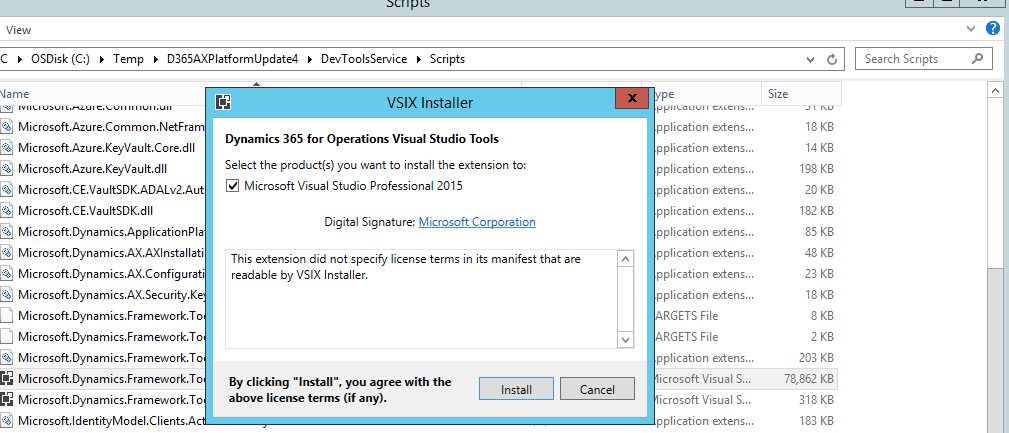
Update Visual Studio Extension 

  • Open Visual Studio and click Tools - Extensions 
    • Uninstall Dynamics 365 for Operations extension
    • restart and close VS 
  • Run the installer
  • After that Version 7.0.4.0 should be installed
     

Regenerate form adaptor models 
  • Cd C:\AOSService\PackagesLocalDirectory\Bin 
  • xppfagen.exe -metadata=C:\AosService\PackagesLocalDirectory -model="ApplicationPlatformFormAdaptor" -xmllog="c:\temp\log1.xml"  
  • xppfagen.exe -metadata=C:\AosService\PackagesLocalDirectory -model="ApplicationFoundationFormAdaptor" -xmllog="c:\temp\log2.xml"  
  • xppfagen.exe -metadata=C:\AosService\PackagesLocalDirectory -model="DirectoryFormAdaptor" -xmllog="c:\temp\log3.xml" 

Install the new Data Management service 

  • Cd into \DIXFService\Scripts  
  • msiExec.exe /uninstall {5C74B12A-8583-4B4F-B5F5-8E526507A3E0} /passive /qn /quiet 
  • msiexec /i "DIXF_Service_x64.msi" ISSQLSERVERVERSION="Bin\2012" SERVICEACCOUNT="NT AUTHORITY\NetworkService" /qb /lv DIXF_log.txt 

Open D365 and check the About Page it should show Platform Update 4 7.0.4425.16161 :)


10 January 2017

D365 | x++ project cannot be built. Another build is in progress

I just faced the following error while trying to built a sollution on my local Dynamics 365 VM:

x++ project cannot been built. another build is in progress.

After trying the usual things like restarting VS and killing tasks without luck, I solved it by rebooting my local VM.
If anyone knows a faster way please leave a comment.

01 August 2016

D365 ¦ Data Management ODBC - Not possible?

Lately I tried to import data into the new Dynamics AXthrough an ODBC Datasource  (DEV Environment deployed by LCS).
While setting up the source data format the following error popped up:

System.IO.FileNotFoundException: Could not find file 'J:\AosService\WebRoot\DMFConfig.xml'. File name: 'J:\AosService\WebRoot\DMFConfig.xml' at Microsoft.Dynamics.AX.Framework.Tools.DMF.ServiceProxy.DmfEntityProxy.GetUserDsn(String machineName, Boolean runOnService)


I tried to get rid of it. After several different attempts I was able to solve this problem with a DMFConfig.xml file copied from an AX 2012 R3 environment.

Now I tried to import data from that ODBC source. AX reacted on the query but I'm still missing an option to import data from ODBC. The import button is dissabled no matter how the import is set up.

Result -> ODBC is not supported right now. Let's see how long it takes till MS will fix it.

14 June 2016

D365 ¦ Use Partitions in the new AX

If you want to administer partitions in the new AX it is hard to figure out how.
The easiest way for me was just adding the following command to the URL: &f=partitionadministration
So that the URL looks like: https://xyzaos.cloudax.dynamics.com/?cmp=DAT&f=partitionadministration

After creating new partitions just add &prt=NameOfThePartition to your URL to navigate to the new partition.
Keep in mind to import the users into the new partition so that they can access the new link: https://xyzaos.cloudax.dynamics.com/?cmp=DAT&prt=new

24 February 2016

The new AX is released ready to web

Yesterday Microsoft announced the release of the new Dynamics AX at the Technical Conference #DynTech2016. We all look forward to see what comes next:

26 January 2016

The new Dynamics AX - It's just around the corner :)


There is a new video out there, to promote the new Dynamics AX. The sentence I do like most is: The new user experience is amazing :)
I do not agree 100% but I guess that's becaus I know the old user and developer Experience. Which differs a lot from the new browserbased interface.

Check out the other videos:


19 January 2016

AX 7: open forms directly

If you want to open a form directly when starting the new Dynamics AX you can add &mi=Formname to the AX URL.
So for example when you want to start AX with the SalesTable listpage just use an URL that Looks like:
https://myax7.dynamics.com/?cmp=USSI&mi=SalesTableListPage

Beside the page that is displayed you can also specify the company with cmp=DAT


07 January 2016

Dynamics AX (AX7) shortcuts

I started playing around with the new Dynamics AX. When looking at the new user interface my first and main concern is the usabilty. So I tried to create a customer and a sales order as fast as possible :)
But be aware that keyboard shortcuts are not the same as in AX 2012 and earlier versions.
For example: don't use STRG + N anymore. It is now ALT + N :)

To help us getting comfortable with the new UI the Dynamics 'AX 7' Technical Preview Help Wiki is a good starting Point.
There you can also find a list of keyboard shortcuts: https://ax.help.dynamics.com/en/wiki/shortcut-keys/