Showing posts with label DMF. Show all posts

15 January 2016

DIXF: DMFProductEntity - displayProductNumber auto generate not working

When importing products to staging table with the Data Import Export Framework through the Entity DMFProductEntity with auto generated displayProductNumber we faced the error message "Numbersequence not set". This is due to the fact that MS has used another EDT in the DMFProductEntity.
The following Workaround helps importing products with generated numbers.
  1. Extend the NumberSeqModuleInventory.loadModule() with the following Code:
// Setup product display number for DMFProductEntity
    datatype.parmDatatypeId(extendedtypenum (EcoResProductDisplayProductNumber));
    datatype.parmReferenceHelp("@SYS301183");
    datatype.parmReferenceLabel(literalstr("@SYS133863"));
    datatype.parmWizardIsContinuous(false);
    datatype.parmWizardIsManual(NoYes::No);
    datatype.parmWizardIsChangeDownAllowed(NoYes::No);
    datatype.parmWizardIsChangeUpAllowed(NoYes::No);
    datatype.parmSortField(1);
    datatype.parmWizardHighest(999999);
    datatype.addParameterType(NumberSeqParameterType::DataArea, true, false);
    this.create(datatype);
  1. Change the method from protected to public
  2. Create a job to call the loadModule method:
    NumberSeqModuleInventory numberSeqModuleInventory = new NumberSeqModuleInventory();numberSeqModuleInventory.loadModule();
  3. Change the method back to protected
  4. Go to Inventory and Warehousemanagement Parameters and set the Number Sequence for Product Number. You could use the same Number Sequence as for Item Number or create a new one.


29 October 2015

DIXF refresh target entity mapping

If you need to update all target mappings in one go, the following job will help you :)


static void DIXFRefreshTargetEntityMap(Args _args)
{
    DMFEntity   entity;

    if (Box::yesNo('Are you sure you want to update all target mappings?'
                 DialogButton::No) == DialogButton::Yes)
    {
        while select entity
        {
            DMFTargetXMLToEntityMap::generateMapping(entity, true);
        }

        info('done');
    }
}

28 January 2015

DIXF crashs when using SQL Server 2012 SP2

Today I was asked how to solve the problem of service crashes of the data import export framework service in an environment that is running SQL Server 2012 SP2.
We had this issue some month ago at a customer who updated the SQL Server according to his regular update plan. Suddenly we were not able to import data with the DIXF anymore. The solution to this issue is the cumulative update CU2 for SQL Server 2012 (http://support.microsoft.com/kb/2983175).

Microsoft announcend the compatibility to SQL Server 2012 SP2 CU2 or higher in the following blog post:
http://blogs.technet.com/b/dynamicsaxse/archive/2014/10/09/announcing-support-for-sql-server-sharepoint-and-office-2013-service-packs-as-well-as-visual-studio-team-foundation-server-and-visual-studio-online.aspx
  • Microsoft SQL Server 2012 SP2 CU2 or later with Microsoft Dynamics AX 2012 R3, Dynamics AX 2012 R2 CU7 and Dynamics AX 2012 CU7

14 November 2014

DIXF: Unable to update records

I recently experienced an issue where I was not able to update records through the data Import export framework. While running the "copy data to terget" step I got a stacktrace in the DMFEntityWriter.write() method in

line 224: if (foundRecord && qRun.changedNo(currentNode.QuerySequenceNo))

After some comparissons with other environments I found out that the target entity was missing a table in the target entity hierarchie.
To solve this issue open the target entity form and click on change target mapping. In that form click details and regenerate the mapping. That also updates the hierarchie and the update is working fine again.

12 November 2014

DIXF: not compatible with SQL 2012 SP2

If you try to import data with the data import export framework and you recieve the following error message:

System.ServiceModel.CommunicationException: Fehler beim Empfangen der HTTP-Antwort für http://AXSQLSERVER:7000/DMFService/DMFServiceHelper.svc. Die Ursache kann sein, dass die Dienstendpunktbindung kein HTTP-Protokoll verwendet. Eine andere mögliche Ursache ist, dass der HTTP-Anforderungskontext vom Server abgebrochen wird (vermutlich auf das Herunterfahren des Diensts zurückzuführen). Weitere Informationen finden Sie in den Serverprotokollen. ---> System.Net.WebException: Die zugrunde liegende Verbindung wurde geschlossen: Unbekannter Fehler beim Empfangen.. ---> System.IO.IOException: Von der Übertragungsverbindung können keine Daten gelesen werden: Eine vorhandene Verbindung wurde vom Remotehost geschlossen. ---> System.Net.Sockets.SocketException: Eine vorhandene Verbindung wurde vom Remotehost geschlossen
   bei System.Net.Sockets.NetworkStream.Read(Byte[] buffer, Int32 offset, Int32 size)
   --- Ende der internen Ausnahmestapelüberwachung ---
   bei System.Net.Sockets.NetworkStream.Read(Byte[] buffer, Int32 offset, Int32 size)
   bei System.Net.PooledStream.Read(Byte[] buffer, Int32 offset, Int32 size)
   bei System.Net.Connection.SyncRead(HttpWebRequest request, Boolean userRetrievedStream, Boolean probeRead)
   --- Ende der internen Ausnahmestapelüberwachung ---
   bei System.Net.HttpWebRequest.GetResponse()
   bei System.ServiceModel.Channels.HttpChannelFactory`1.HttpRequestChannel.HttpChannelRequest.WaitForReply(TimeSpan timeout)
   --- Ende der internen Ausnahmestapelüberwachung ---

Server stack trace:
   bei System.ServiceModel.Channels.HttpChannelUtilities.ProcessGetResponseWebException(WebException webException, HttpWebRequest request, HttpAbortReason abortReason)
   bei System.ServiceModel.Channels.HttpChannelFactory`1.HttpRequestChannel.HttpChannelRequest.WaitForReply(TimeSpan timeout)
   bei System.ServiceModel.Channels.RequestChannel.Request(Message message, TimeSpan timeout)
   bei System.ServiceModel.Channels.ServiceChannel.Call(String action, Boolean oneway, ProxyOperationRuntime operation, Object[] ins, Object[] outs, TimeSpan timeout)
   bei System.ServiceModel.Channels.ServiceChannelProxy.InvokeService(IMethodCallMessage methodCall, ProxyOperationRuntime operation)
   bei System.ServiceModel.Channels.ServiceChannelProxy.Invoke(IMessage message)

Exception rethrown at [0]:
   bei System.Runtime.Remoting.Proxies.RealProxy.HandleReturnMessage(IMessage reqMsg, IMessage retMsg)
   bei System.Runtime.Remoting.Proxies.RealProxy.PrivateInvoke(MessageData& msgData, Int32 type)
   bei Microsoft.Dynamics.AX.DMF.ServiceProxy.DMFServiceReference.ServiceContract.ShowPreview(DMFEntity entity)
   bei Microsoft.Dynamics.AX.DMF.ServiceProxy.DmfEntityProxy.DoWork[T](Func`1 work)


You will notice that the DIXF service has crashed, Check the Version of the SQL Server. If you are running SQL Server 2012 with SP2 (11.0.5058.0) or even SP2 CU1 (11.0.5532.0) you need to update to CU2 (11.0.5548.0) -

11 November 2014

DIXF: File or Assambly not found

Client Error:

If you get the following message in the infolog. Check if the client components of the data import export framework are installed for the current client.

Die Datei oder Assembly "Microsoft.Dynamics.AX.DMF.PreviewGrid, Version=6.2.0.0, Culture=neutral, PublicKeyToken=31bf3856ad364e35" oder eine Abhängigkeit davon wurde nicht gefunden. Das System kann die angegebene Datei nicht finden.

Therefor navigate to the Dynamics AX client\bin folder and search for Microsoft.Dynamics.AX.DMF.*. There should be at least four dll files. If not reinstall the client components or copy the files from another client Folder.

Server Error:

If there is no Service URL in the Data Import Export Parameter form and the infolog is showing the following error:

Auf die Assembly, die Typ Microsoft.Dynamics.AX.DMF.ServiceProxy.DmfEntityProxy enthält, wird nicht verwiesen. Objekt 'CLRObject' konnte nicht erstellt werden.

If you get this error check if the DIXF (DMF) components for the AOS are installed:

  • For AX2012 R2 till CU6 use the DIXF package 
  • For AX2012 R2 CU7 install DIXF from the CU7 update package 
  • For Ax2012 R3 use the DIXF component that are provided by the R3 installation 
After the installation of the DIXF Components for the AOS Server restart the AOS!!!

DIXF: Parameters Service URL - Dienstverbindungs-URL

If you have problems with a wrong service url in the data import export framework Parameters there are 2 ways to change it:


You should navigate to the AX "Server/bin" folder and edit the Microsoft.Dynamics.AX.DMF.ServiceProxy.dll.config file. In this file you will see the xml tag for the endpoint address. There you can enter the correct address. That's it :) I restarted the AOS afterwards, but I'm not quite sure if this is necessary.


Another option is to unistall the DIXF AOS Component and reinstall it. During the installation you will be asked to enter the server name.

29 August 2014

Dataimport/-export Framework DMF / DIXF - broken target entity

The Dataimport/-export Framework is a great tool to get a lot of data into AX. But like most of the nice tools the Feedback is sometimes not as detailed as it could be.

While working on some imports with standard entities I was unable to move data from staging to target.

The infolog showed the well known message that 0 records had been inserted into target. So I started some research. Best hint was the message from the Validation of the target entity which was:

Target XML tags are not generated and hierarchy cannot be found

Die Ziel-XML-Markierungen wurden nicht generiert, und die Hierarchie kann nicht gefunden werden.

So I checked the structure of the entity which was empty. I still don't know how this could happen, but there is an easy way to recreate this structure. The following lines of code will help:


DMFEntity   dmfEntity;

select dmfEntity where dmfEntity.EntityName == "BrokenEntityName";

if (dmfEntity.EntityType == DMFEntityTypes::Entity)
{
    DMFTargetXML::buildQueryDS(dmfEntity);
    DMFTargetXMLToEntityMap::generateMapping(dmfEntity);
}

08 May 2014

Data Import Export Framework escape text qualifier

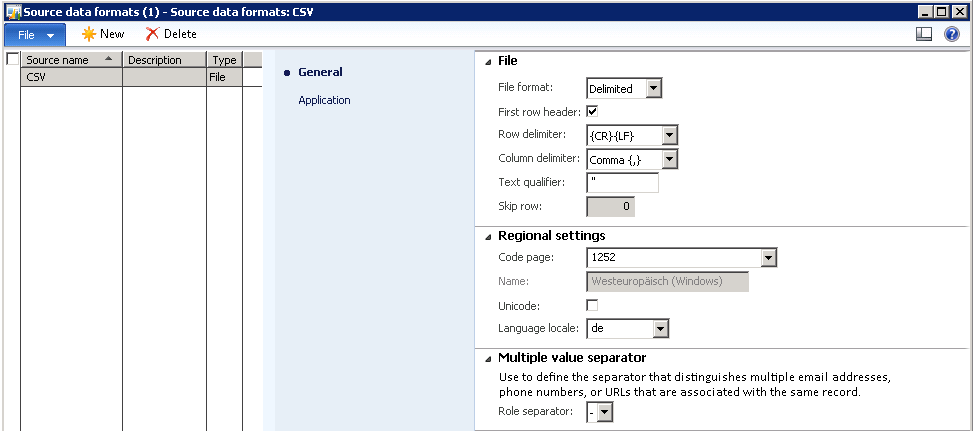
If you want to import text with the DIXF (DMF) that is delimited with a text qualifier you Need to take care that the text qualifier does not accure within the text.

1;"example "test" text";123

This will lead to an error. Actually Microsoft suggests to use a unique text qualifier. One possible Option is to use more than one character:

1;@@example "test" text@@;123

Another way to deal with this is to escape the occuring character within the text. Due to the fact that you cannot specifiy the escape string in AX I tried several ways to do the escape. \" is not working. Instead you have to double the character:

1;"example ""test"" text";123

This will Import the text example "test" text into the database.


13 February 2014

Microsoft.Dynamics.AX.DMF.ServiceProxy.dll.config

If you recieve the following error message when opening DIXF forms after updating to CU7 there is an easy Workaround to fix this issue


System.InvalidOperationException: Die Konfigurationsdatei C:\Program Files\Microsoft Dynamics AX\60\Server\AX2012R2CU7\Bin\Microsoft.Dynamics.AX.DMF.ServiceProxy.dll.config der Anwendung wurde nicht gefunden. Stellen Sie sicher, dass für die Assembly, die den spezifischen Dienstclienttyp enthält, eine Quelldatei für die Anwendungskonfiguration vorhanden ist. Die folgenden Pfade wurden geprüft:
C:\Windows\Microsoft.Net\assembly\GAC_MSIL\Microsoft.Dynamics.AX.DMF.ServiceProxy\v4.0_6.2.0.0__31bf3856ad364e35\Microsoft.Dynamics.AX.DMF.ServiceProxy.dll.config
...

Navigate to the Server Folder of your AX Installation and check if the following files are located in the common Directory (C:\Program Files\Microsoft Dynamics AX\60\Server\Common)
  • DMFConfig.xml
  • DMFClientConfig.xml
  • Microsoft.Dynamics.AX.DMF.ServiceProxy.dll.config
if yes just copy them into the Server bin Directory of the instance (C:\Program Files\Microsoft Dynamics AX\60\Server\AX2012R2CU7\Bin\)

If these files are not stored there they could also be in the data Import Export Folder (C:\Program Files\Microsoft Dynamics AX 2012 Data Import Export Framework Server Component)


16 December 2013

Data Import Export Framework - Problems with shared working directory

Recently I had issues with access validation of the shared working directory for the data import export framework (alias data migration framework).

If the validation is telling you that the service is not able to access the directory you should check on the SQL Server
  • if the data import export service is running
  • which account is used to run the service
  • is this account able to write into that shared dirctory
If the service is not running AX is alsojust telling you that the service account is not able to access the folder. even though the user has the right credentials.