
To sign a model file you need an SNK file. If you don't have one just generate a key pair with the following command:
C:\Program Files\Microsoft SDKs\Windows\v7.0A\Bin\sn.exe -k YOURKEYFILE.snk
/(in older Versions it also could be in v6.0A)
After that the snk file can be used to sign the model that is exported from an AOS. Make sure to set the client config to the right AOS and than just use the following command:
AxUtil export /model:NAMEOFTHEMODEL /file:MODEL.axmodel /key:
YOURKEYFILE.snk
TECHNICAL TOPICS: MICROSOFT DYNAMICS AX & DYNAMICS 365 FOR FINANCE AND OPERATIONS - ENTERPRISE EDITION
23 July 2012

19 June 2012
VisualStudio Message - .NetFramework.Version=v4.0 Profile Full

When this message apperas during upgrade of a VisualStudio 2008 project to VisualStudio 2010. Just open the .csproj file in an editor and remove the line:
<targetframeworksubset>Full</targetframeworksubset>
11 June 2012
AXUtil and Powershell
just to remeber the right syntax:
Import Model:
axutil import /file:abc.axmodel /conflict:push /config:AOSname
Delete Layer:
axutil delete /layer:usr /config:AOSname
instead of /config: it is possible to use the dbName /db:DBname
PowerShell
Uninstall-AXModel-Database "NameOfDB" -Model "NameOfModel"
Import Model:
axutil import /file:abc.axmodel /conflict:push /config:AOSname
Delete Layer:
axutil delete /layer:usr /config:AOSname
instead of /config: it is possible to use the dbName /db:DBname
PowerShell
Uninstall-AXModel
05 June 2012
SSRS Report: Display Image from Database
To display an image from DynamicsAX in an SSRS report the easiest way is to add an EDT that Extends the Bitmap EDT to the tmp table for the report. In the Dataprovider just add the image to the tmp table (for further information about image handling in ax check the image class).
Than add an image object onto the report design and set the properties. Select the right MIME-Type and try it!

21 May 2012

19 April 2012
Add a single postal location to an ax 2012 form
To add a single postal address to a form with the new ActionPane there are several steps to do:
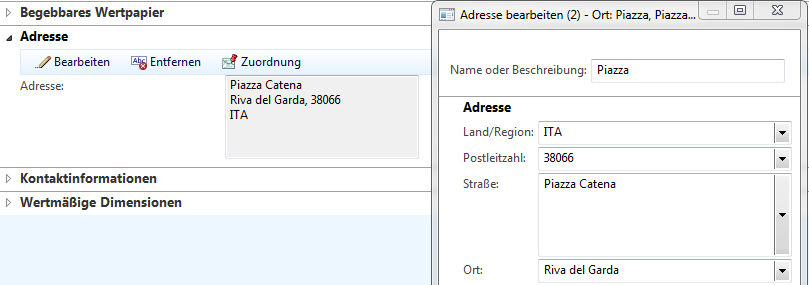
- Add the EDT LogisticsLocationRecId to the table where the new postalAddress should be added
- Add this table to the LogisticsLocationMap and create a Mapping: LogisticsLocationMap.Location == theNewTable.LogsticsLocationRecId
- Add the LogisticsPostalAddress Table to the Form

- Paste the following code to the form:
public class FormRun extends ObjectRun
{
LogisticsPostalAddressFormHandler addressController;
}
public void init()
{
LogisticsPostalAddressFormHandler::newParameters(newTable_ds, logisticsPostalAddress_ds);
}public LogisticsPostalAddressFormHandler getAddressController()
{
return addressController;} - Place an ActionPane to your form with the MenuItemButtons New/Edit/Clear/Map.
The easiest way to do this is to copy and paste it from the BankAccountTable form.
- Add this Code to the active method of the main DS:
public int active()
{
int ret;
ret = super();
if (ret)
{
addressController.callerActive();
addressController.callerUpdateButtons(newAddress, editAddress, clearAddress, mapButton);
}
return ret;
} - after that synchronize table and map and than try to open the form ;)
11 April 2012
Problems with ordering grid columns
If there are problems with the ordering of grid columns of a grid inside a tab although the AllowUserSetup of the form is set to Yes. Check if the method tabChanged of the tab control is overwritten. Overwriting this method can cause problems with the re-ordering.
Instead of using the TabChanged on the tab control move the code to the pageActivated method of the TabPage.
Instead of using the TabChanged on the tab control move the code to the pageActivated method of the TabPage.
Subscribe to:
Posts (Atom)