Showing posts with label Mobile Device. Show all posts

30 June 2015

AX 2012 R3 | Mobile Device Portal | Connect to different AOS

You can install the Warehouse Mobile Devices Portal on whatever server you like. It just needs IIS
By default, Warehouse Mobile Devices Portal is configured to connect to an AOS instance that is installed on the same computer with ServicePort 8201.
If that is not the case, you must modify the web.config file for the instance of Warehouse Mobile Devices Portal.

Therefor open Internet Information Services (IIS) Manager:
  1. Right-click the website for an instance of Warehouse Mobile Devices Portal and click Explore: 
  2. Open the web.config file in a text editor and locate the net.tcp binding that is named NetTcpBinding_WHSMobileDevicesService. 
  3. Update the endpoint address that is associated with the net.tcp binding. 
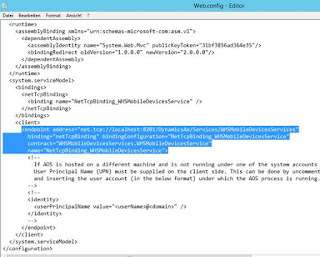
  4. Save and close the web.config file.

AX 2012 R3 | Mobile Device Portal | display settings

If the mobile device is showing this error:

Die Schnittstelle des mobilen Geräts kann nicht geöffnet werden, da entweder die Anzeigeeinstellungen nicht oder falsch konfiguriert sind. Konfigurieren Sie gültige Einstellungen für die Anzeige des mobilen Geräts.

The mobile device interface cannot be opened because either the display settings are not configured or they are configured incorrectly. Configure valid settings for the mobile device display.

Check the default company account for the user that is used by the warehouse mobilde device portal to coneect ot AX. Then jump into that company and check the display settings:

Warehouse management > Setup > Mobile device > Work user mobile device display settings

In most cases the settings are not correct in that company:
One valid line can look like: Default, Yes, defaultrf.css, DisplayIEOS